
What is AlianHub?
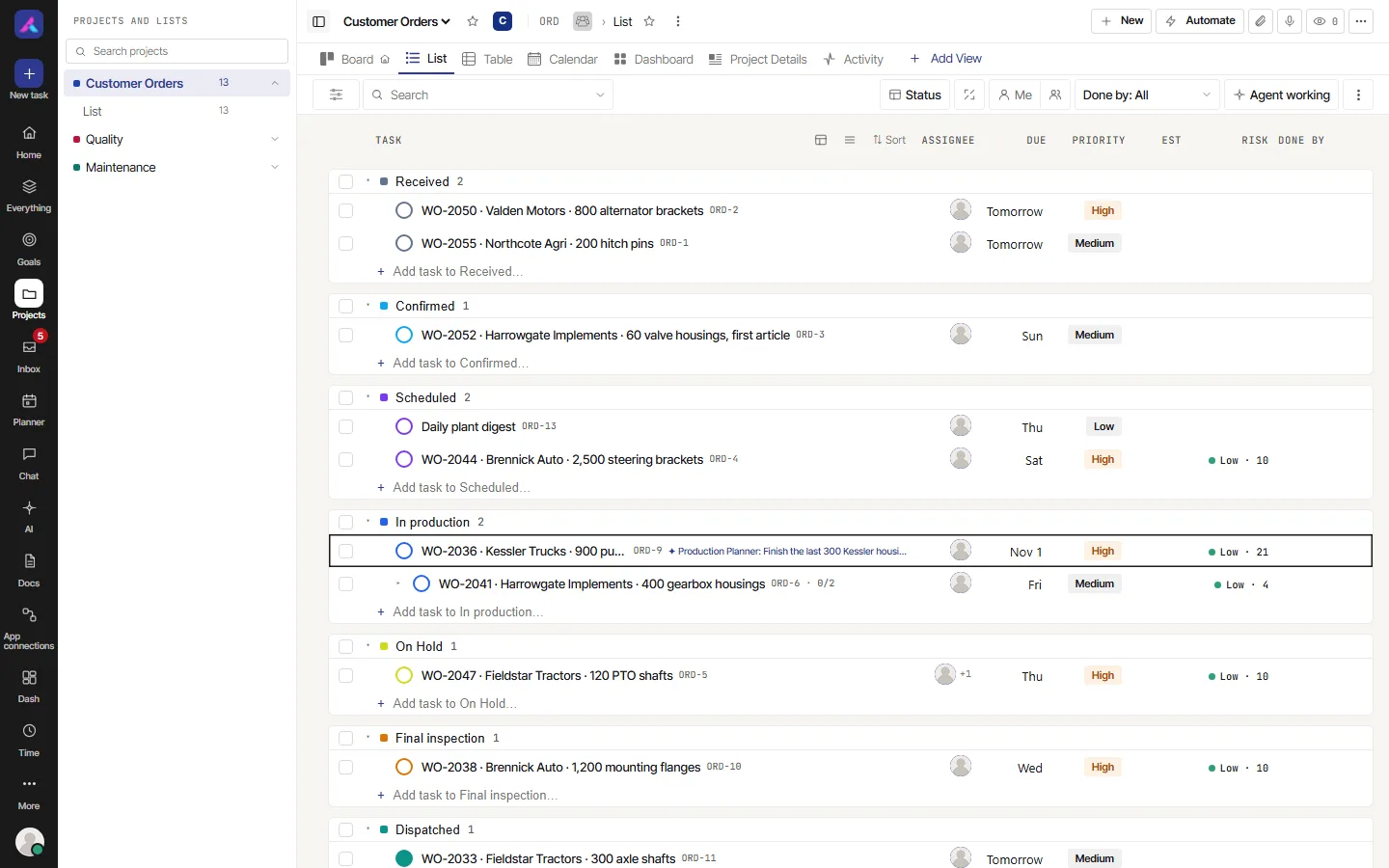
AlianHub is an open-source project management system that you can run on your own server. Teams use it to plan work, share it out, track it to done, log the time it took, and keep the writing and the conversation next to the tasks they are about. This page tells you who it is for, what it does, how you can get it, and where to go next.
Who it is for
AlianHub suits teams that want one place for their work and want to keep control of it:
- Agencies and service teams that run client projects, bill by the hour or by milestone, and need timesheets approved.
- Software and product teams that plan in sprints, track bugs and features, and want boards, burn-down and a Gantt chart.
- Operations, marketing, design and support teams that need a clear list of who is doing what, and by when.
- Companies with rules about where their data lives. You can run AlianHub on your own servers, so your data stays with you.
You do not need to be technical to use it. The person who installs it does. That part is covered in the Admin guide.
What it does
| Area | What you get |
|---|---|
| Projects | One project per piece of work, with its own statuses, task types, members, apps and views. Private projects for work only some people should see. |
| Folders, lists and sprints | Lists hold tasks. Folders group lists. Any list can run as a sprint with a start, an end and a goal. |
| Tasks | Assignees, watchers, statuses, priority, start and due dates, estimates, story points, checklists, subtasks three levels deep, files, comments with mentions, relations between tasks, and tasks that repeat. |
| Views | The same tasks as a List, Board, Table, Calendar, Gantt or Workload, plus Embed, Docs, Forms, Activity and more. Filters, grouping, sorting and saved views. |
| Custom fields and rules | Your own fields, including formulas and rollups. Rules (automations) that act when something happens. |
| Time | Timers and manual time on tasks, a weekly timesheet, submit and approve, billable time, and a desktop time tracker. |
| Docs and whiteboards | Pages of writing with comments, versions and sharing. Whiteboards where a list's tasks sit as cards you can arrange. |
| Chat and the Inbox | Channels and direct conversations, and one Inbox that tells you what needs you. |
| Reports | Dashboards, sprint reports, milestones, variance between estimate and actual, and your own reports. |
| AI | Ask AlianHub, the built-in assistant. AI help in tasks, docs and fields. And you can connect your own AI app, such as Claude or ChatGPT, so it can work in AlianHub for you, with your approval. |
| Self-hosted | You run it on your own server, with your own database and file storage. |
| Multi-company | One installation can hold many workspaces (companies). Each one's data is kept apart from the others. A person can belong to more than one and switch between them. |
| Open source | The code is public under the AGPL-3.0 licence. You can read it, change it and run it. |
How you can get it
| Option | What it means | Start here |
|---|---|---|
| Self-host | You install AlianHub on your own server or computer and run it yourself. | Admin guide, Install with Docker |
| AlianHub Cloud | AlianHub is run for you, so you only sign up and use it. | Ask the AlianHub team; see Getting help |
| Live demo | A shared demo workspace with sample data, to look around before you decide. | demo.alianhub.com |
The demo is shared
Other people use the live demo at the same time. Do not put real or private information in it.
Where to go next
- New to AlianHub? Take Your first hour. Nine short pages, in order.
- Want to look around first? Read the Quick tour.
- Not sure what a word means? See Concepts and glossary.
- Looking for one feature? Go to the User guide.
- Want your AI app to do the clicking? See Connect your AI.
- Installing it? See the Admin guide.
- Building on it? See the Developer guide and the API.